# International Telephone Input [](https://app.travis-ci.com/jackocnr/intl-tel-input)
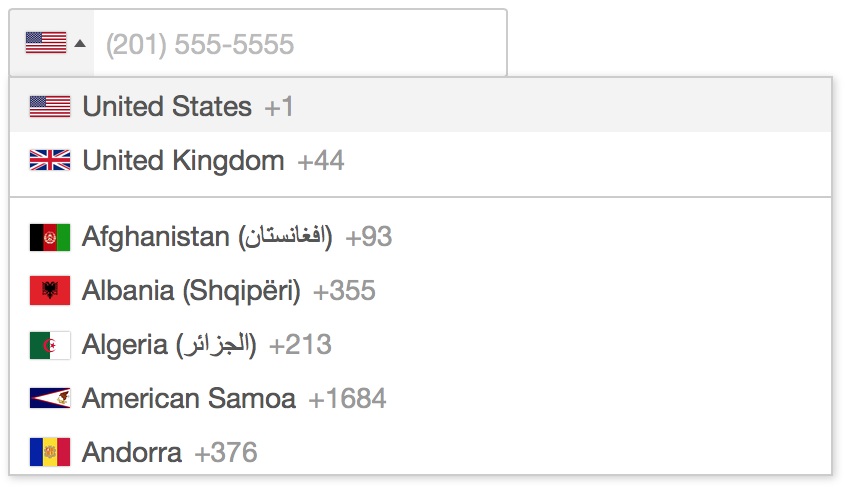
A JavaScript plugin for entering and validating international telephone numbers. It adds a flag dropdown to any input, detects the user's country, displays a relevant placeholder and provides formatting/validation methods.
If you find the plugin helpful, please consider [supporting the project](https://github.com/sponsors/jackocnr).
## Sponsored by
Use Twilio's API to build phone verification, SMS 2FA, appointment reminders, marketing notifications and so much more. We can't wait to see what you build.
## Table of Contents
- [Demo and Examples](#demo-and-examples)
- [Features](#features)
- [Browser Compatibility](#browser-compatibility)
- [Getting Started](#getting-started-using-a-cdn)
- [Recommended Usage](#recommended-usage)
- [Options](#initialisation-options)
- [Public Methods](#public-methods)
- [Static Methods](#static-methods)
- [Events](#events)
- [Utilities Script](#utilities-script)
- [Troubleshooting](#troubleshooting)
- [Contributing](#contributing)
- [Attributions](#attributions)
## Demo and Examples
You can view [a live demo](https://intl-tel-input.com) and see some examples of how to use the various options, or try it for yourself using the included demo.html.
## Features
* Automatically select the user's current country using an IP lookup
* Automatically set the input placeholder to an example number for the selected country
* Navigate the country dropdown by typing a country's name, or using up/down keys
* Handle phone number extensions
* The user types their national number and the plugin gives you the full standardized international number
* Full validation, including specific error types
* Retina flag icons
* Lots of initialisation options for customisation, as well as public methods for interaction
* Accessibility provided via ARIA tags based on [W3's Select-Only Combobox Example](https://www.w3.org/WAI/ARIA/apg/patterns/combobox/examples/combobox-select-only/)
## Browser Compatibility
| Chrome | Firefox | Safari | Edge |
| :----: | :-------: | :----: | :--: |
| ✓ | ✓ | ✓ | ✓ |
_Note: We have now dropped support for all versions of Internet Explorer because it is [no longer supported](https://blogs.windows.com/windowsexperience/2022/06/15/internet-explorer-11-has-retired-and-is-officially-out-of-support-what-you-need-to-know/) by any version of Windows._
## Getting Started (Using a CDN)
1. Add the CSS
```html
```
2. Add the plugin script and initialise it on your input element
```html
```
## Getting Started (Using a bundler e.g. Webpack)
1. Install with npm: `npm install intl-tel-input --save` or yarn: `yarn add intl-tel-input`
2. Import the CSS: `import 'intl-tel-input/build/css/intlTelInput.css';`
3. Override the path to flags.png in your CSS
```css
.iti__flag {background-image: url("path/to/flags.png");}
@media (-webkit-min-device-pixel-ratio: 2), (min-resolution: 192dpi) {
.iti__flag {background-image: url("path/to/flags@2x.png");}
}
```
4. Import the JS and initialise the plugin on your input element
```js
import intlTelInput from 'intl-tel-input';
const input = document.querySelector("#phone");
intlTelInput(input, {
utilsScript: "path/to/utils.js"
});
```
## Getting Started (Not using a bundler)
1. Download the [latest release](https://github.com/jackocnr/intl-tel-input/releases/latest), or better yet install it with [npm](https://www.npmjs.com/package/intl-tel-input)
2. Add the stylesheet
```html
```
3. Override the path to flags.png in your CSS
```css
.iti__flag {background-image: url("path/to/flags.png");}
@media (-webkit-min-device-pixel-ratio: 2), (min-resolution: 192dpi) {
.iti__flag {background-image: url("path/to/flags@2x.png");}
}
```
4. Add the plugin script and initialise it on your input element
```html
```
## Recommended Usage
We highly recommend you (lazy) load the included utils.js using the `utilsScript` option. Then the plugin is built to always deal with numbers in the full international format (e.g. "+17024181234") and convert them accordingly - even when `nationalMode` or `separateDialCode` is enabled. We recommend you get, store, and set numbers exclusively in this format for simplicity - then you don't have to deal with handling the country code separately, as full international numbers include the country code information.
You can always get the full international number (including country code) using `getNumber`, then you only have to store that one string in your database (you don't have to store the country separately), and then the next time you initialise the plugin with that number it will automatically set the country and format it according to the options you specify (e.g. when using `nationalMode` it will automatically display the number in national format, removing the international dial code).
Finally, make sure you have `` in the `` section of your page, else you will get an error as the JS contains some special unicode characters for localised country names.
## Initialisation Options
When you initialise the plugin, the first argument is the input element, and the second is an object containing any initialisation options you want, which are detailed below. Note: any options that take country codes should be [ISO 3166-1 alpha-2](https://en.wikipedia.org/wiki/ISO_3166-1_alpha-2) codes
**allowDropdown**
Type: `Boolean` Default: `true`
Whether or not to allow the dropdown. If disabled, there is no dropdown arrow, and the selected flag is not clickable. Also we display the selected flag on the right instead because it is just a marker of state.
**autoInsertDialCode**
Type: `Boolean` Default: `false`
When enabled (requires `nationalMode` to be disabled), the international dial code will be automatically inserted into the input in 3 situations: (A) upon initialisation, and (B) when the user selects a country from the dropdown, and (C) upon calling `setCountry`. Additionally, the plugin will listen for blur/submit events, and if the input only contains a dial code, it will automatically be removed to avoid submitting just that.
**autoPlaceholder**
Type: `String` Default: `"polite"`
Set the input's placeholder to an example number for the selected country, and update it if the country changes. You can specify the number type using the `placeholderNumberType` option. By default it is set to `"polite"`, which means it will only set the placeholder if the input doesn't already have one. You can also set it to `"aggressive"`, which will replace any existing placeholder, or `"off"`. Requires the `utilsScript` option.
**customContainer**
Type: `String` Default: `""`
Additional classes to add to the parent div.
**customPlaceholder**
Type: `Function` Default: `null`
Change the placeholder generated by autoPlaceholder. Must return a string.
```js
intlTelInput(input, {
customPlaceholder: function(selectedCountryPlaceholder, selectedCountryData) {
return "e.g. " + selectedCountryPlaceholder;
},
});
```
**dropdownContainer**
Type: `Node` Default: `null`
Expects a node e.g. `document.body`. Instead of putting the country dropdown next to the input, append it to the specified node, and it will then be positioned absolutely next to the input using JavaScript. This is useful when the input is inside a container with `overflow: hidden`. Note that the absolute positioning can be broken by scrolling, so it will automatically close on the `window` scroll event.
**excludeCountries**
Type: `Array` Default: `undefined`
In the dropdown, display all countries except the ones you specify here.
**formatOnDisplay**
Type: `Boolean` Default: `true`
Format the input value (according to the `nationalMode` option) during initialisation, and on `setNumber`. Requires the `utilsScript` option.
**geoIpLookup**
Type: `Function` Default: `null`
When setting `initialCountry` to `"auto"`, you must use this option to specify a custom function that looks up the user's location, and then calls the success callback with the relevant country code. Also note that when instantiating the plugin, if the [Promise](https://developer.mozilla.org/en-US/docs/Web/JavaScript/Reference/Global_Objects/Promise) object is defined, one of those is returned under the `promise` instance property, so you can do something like `iti.promise.then(callback)` to know when initialisation requests like this have completed.
Here is an example using the [ipapi](https://ipapi.co/api/?javascript#location-of-clients-ip) service:
```js
intlTelInput(input, {
initialCountry: "auto",
geoIpLookup: function(callback) {
fetch("https://ipapi.co/json")
.then(function(res) { return res.json(); })
.then(function(data) { callback(data.country_code); })
.catch(function() { callback("us"); });
}
})
```
_Note that the callback must still be called in the event of an error, hence the use of `catch()` in this example. Tip: store the result in a cookie to avoid repeat lookups!_
**hiddenInput**
Type: `String` Default: `""`
Add a hidden input with the given name. Alternatively, if your input name contains square brackets (e.g. `name="phone_number[main]"`) then it will give the hidden input the same name, replacing the contents of the brackets with the given name (e.g. if you init the plugin with `hiddenInput: "full"`, then in this case the hidden input would have `name="phone_number[full]"`). On submit, it will automatically populate the hidden input with the full international number (using `getNumber`). This is a quick way for people using non-Ajax forms to get the full international number, even when `nationalMode` is enabled. Avoid this option when using Ajax forms and instead just call `getNumber` to get the full international number to send in the request. _Note: requires the input to be inside a form element, as this feature works by listening for the submit event on the closest form element. Also note that since this uses `getNumber` internally, firstly it requires the `utilsScript` option, and secondly it expects a valid number and so should only be used after validation._
**initialCountry**
Type: `String` Default: `""`
Set the initial country selection by specifying its country code. You can also set it to `"auto"`, which will lookup the user's country based on their IP address (requires the `geoIpLookup` option - [see example](https://intl-tel-input.com/examples/lookup-country.html)). Note that the `"auto"` option will not update the country selection if the input already contains a number.
If you leave `initialCountry` blank, it will default to the first country in the list.
**localizedCountries**
Type: `Object` Default: `{}`
Allow localisation of country names. For each country, the key should be the iso2 country code, and the value should be the localised country name. [See example](https://intl-tel-input.com/examples/localise-countries.html).
```js
// Country names in German
{
fr: "Frankreich",
de: "Deutschland",
es: "Spanien",
it: "Italien",
ch: "Schweiz",
nl: "Niederlande",
at: "Österreich",
dk: "Dänemark",
}
```
**nationalMode**
Type: `Boolean` Default: `true`
Format numbers in the national format, rather than the international format. This applies to placeholder numbers, and when displaying user's existing numbers. Note that it's fine for user's to type their numbers in national format - as long as they have selected the right country, you can use `getNumber` to extract a full international number - [see example](https://intl-tel-input.com/examples/national-mode.html). It is recommended to leave this option enabled, to encourage users to enter their numbers in national format as this is usually more familiar to them and so it creates a better user experience.
**onlyCountries**
Type: `Array` Default: `undefined`
In the dropdown, display only the countries you specify - [see example](https://intl-tel-input.com/examples/only-countries.html).
**placeholderNumberType**
Type: `String` Default: `"MOBILE"`
Specify [one of the keys](https://github.com/jackocnr/intl-tel-input/blob/master/src/js/utils.js#L119) from the global enum `intlTelInputUtils.numberType` e.g. `"FIXED_LINE"` to set the number type to use for the placeholder.
**preferredCountries**
Type: `Array` Default: `["us", "gb"]`
Specify the countries to appear at the top of the list.
**separateDialCode**
Type: `Boolean` Default: `false`
Display the country dial code next to the selected flag.
**showFlags**
Type: `Boolean` Default: `true`
Set this to false to hide the flags e.g. for political reasons. Must be used in combination with `separateDialCode` option, or with setting `allowDropdown` to `false`.
**useFullscreenPopup**
Type: `Boolean` Default: `true on mobile devices, false otherwise`
Control when the country list appears as a fullscreen popup vs a dropdown. By default, it will appear as a fullscreen popup on mobile devices (based on user-agent and screen width), and as a dropdown on larger devices/screens.
**utilsScript**
Type: `String` Default: `""` Example: `"build/js/utils.js"`
Enable formatting/validation etc. by specifying the URL of the included utils.js script (or alternatively just point it to the file on [cdnjs.com](https://cdnjs.com/libraries/intl-tel-input)). The script is fetched only when the page has finished loading (on the window load event) to prevent blocking (the script is ~215KB). When instantiating the plugin, if the [Promise](https://developer.mozilla.org/en-US/docs/Web/JavaScript/Reference/Global_Objects/Promise) object is defined, one of those is returned under the `promise` instance property, so you can do something like `iti.promise.then(callback)` to know when initialisation requests like this have finished. See [Utilities Script](#utilities-script) for more information.
## Public Methods
In these examples, `iti` refers to the plugin instance which gets returned when you initialise the plugin e.g. `const iti = intlTelInput(input)`
**destroy**
Remove the plugin from the input, and unbind any event listeners.
```js
iti.destroy();
```
**getExtension**
Get the extension from the current number. Requires the `utilsScript` option.
```js
const extension = iti.getExtension();
```
Returns a string e.g. if the input value was `"(702) 555-5555 ext. 1234"`, this would return `"1234"`
**getNumber**
Get the current number in the given format (defaults to [E.164 standard](https://en.wikipedia.org/wiki/E.164)). The different formats are available in the enum `intlTelInputUtils.numberFormat` - which you can see [here](https://github.com/jackocnr/intl-tel-input/blob/master/src/js/utils.js#L109). Requires the `utilsScript` option. _Note that even if `nationalMode` is enabled, this can still return a full international number. Also note that this method expects a valid number, and so should only be used after validation._
```js
const number = iti.getNumber();
// or
const number = iti.getNumber(intlTelInputUtils.numberFormat.E164);
```
Returns a string e.g. `"+17024181234"`
**getNumberType**
Get the type (fixed-line/mobile/toll-free etc) of the current number. Requires the `utilsScript` option.
```js
const numberType = iti.getNumberType();
```
Returns an integer, which you can match against the [various options](https://github.com/jackocnr/intl-tel-input/blob/master/src/js/utils.js#L119) in the global enum `intlTelInputUtils.numberType` e.g.
```js
if (numberType === intlTelInputUtils.numberType.MOBILE) {
// is a mobile number
}
```
_Note that in the US there's no way to differentiate between fixed-line and mobile numbers, so instead it will return `FIXED_LINE_OR_MOBILE`._
**getSelectedCountryData**
Get the country data for the currently selected flag.
```js
const countryData = iti.getSelectedCountryData();
```
Returns something like this:
```js
{
name: "Afghanistan (افغانستان)",
iso2: "af",
dialCode: "93"
}
```
**getValidationError**
Get more information about a validation error. Requires the `utilsScript` option.
```js
const error = iti.getValidationError();
```
Returns an integer, which you can match against the [various options](https://github.com/jackocnr/intl-tel-input/blob/master/src/js/utils.js#L153) in the global enum `intlTelInputUtils.validationError` e.g.
```js
if (error === intlTelInputUtils.validationError.TOO_SHORT) {
// the number is too short
}
```
**isPossibleNumber**
Check if the current number is possible - [see example](https://intl-tel-input.com/examples/validation-practical.html). This is a simple form of validation that only checks the length of the number but should be sufficient for most use cases. See `isValidNumber` for more accurate validation, but the advantage of `isPossibleNumber` is that it is much more future-proof as while countries around the world regularly update their number rules, they very rarely change their number lengths. If it returns false, you can use `getValidationError` to get more information. Requires the `utilsScript` option.
```js
const isPossible = iti.isPossibleNumber();
```
Returns: `true`/`false`
**isValidNumber**
Check if the current number is valid - [see example](https://intl-tel-input.com/examples/validation.html). This is a precise form of validation, with specific matching rules for each area code etc. Note that these rules change each month for various countries around the world, so you need to be careful to keep the plugin up-to-date else you will start rejecting valid numbers. For a simpler and more future-proof form of validation, see `isPossibleNumber` above. If validation fails, you can use `getValidationError` to get more information. Requires the `utilsScript` option.
```js
const isValid = iti.isValidNumber();
```
Returns: `true`/`false`
**setCountry**
Change the country selection (e.g. when the user is entering their address).
```js
iti.setCountry("gb");
```
**setNumber**
Insert a number, and update the selected flag accordingly. _Note that if `formatOnDisplay` is enabled, this will attempt to format the number to either national or international format according to the `nationalMode` option._
```js
iti.setNumber("+447733123456");
```
**setPlaceholderNumberType**
Change the placeholderNumberType option.
```js
iti.setPlaceholderNumberType("FIXED_LINE");
```
## Static Methods
**getCountryData**
Retrieve the plugin's country data - either to re-use elsewhere e.g. to generate your own country dropdown - [see example](https://intl-tel-input.com/examples/country-sync.html), or alternatively, you could use it to modify the country data. Note that any modifications must be done before initialising the plugin.
```js
const countryData = window.intlTelInputGlobals.getCountryData();
```
Returns an array of country objects:
```js
[{
name: "Afghanistan (افغانستان)",
iso2: "af",
dialCode: "93"
}, ...]
```
**getInstance**
After initialising the plugin, you can always access the instance again using this method, by just passing in the relevant input element.
```js
const input = document.querySelector('#phone');
const iti = window.intlTelInputGlobals.getInstance(input);
iti.isValidNumber(); // etc
```
**loadUtils**
An alternative to the `utilsScript` option, this method lets you manually load the utils.js script on demand, to enable formatting/validation etc. See [Utilities Script](#utilities-script) for more information. This method should only be called once per page. If the [Promise](https://developer.mozilla.org/en-US/docs/Web/JavaScript/Reference/Global_Objects/Promise) object is defined, one of those is returned so you can use `loadUtils().then(callback)` to know when it's finished.
```js
window.intlTelInputGlobals.loadUtils("build/js/utils.js");
```
## Events
You can listen for the following events on the input.
**countrychange**
This is triggered when the selected flag is updated e.g. if the user selects a country from the dropdown, or they type a different dial code into the input, or you call `setCountry` etc.
```js
input.addEventListener("countrychange", function() {
// do something with iti.getSelectedCountryData()
});
```
See an example here: [Country sync](https://intl-tel-input.com/examples/country-sync.html)
**open:countrydropdown**
This is triggered when the user opens the dropdown.
**close:countrydropdown**
This is triggered when the user closes the dropdown.
## Utilities Script
The utilities script ([build/js/utils.js](build/js/utils.js)) is a custom build of Google's [libphonenumber](https://github.com/googlei18n/libphonenumber) which enables the following features:
* Formatting upon initialisation, as well as with `getNumber` and `setNumber`
* Validation with `isValidNumber`, `getNumberType` and `getValidationError` methods
* Placeholder set to an example number for the selected country - even specify the type of number (e.g. mobile) using the `placeholderNumberType` option
* Extract the standardised (E.164) international number with `getNumber` even when using the `nationalMode` option
International number formatting/validation is hard (it varies by country/district, and we currently support ~230 countries). The only comprehensive solution I have found is libphonenumber, from which I have precompiled the relevant parts into a single JavaScript file and included in the build directory. Unfortunately even after minification it is still ~215KB, but if you use the `utilsScript` option then it will only fetch the script when the page has finished loading (to prevent blocking). If size is not a concern, then you can manually include the script yourself however you like, and as long as it has loaded before you initialise the plugin then it should work fine.
To recompile the utils script yourself (e.g. to update the version of libphonenumber it is built from), see the [contributing guide](https://github.com/jackocnr/intl-tel-input/blob/master/.github/CONTRIBUTING.md#updating-to-a-new-version-of-libphonenumber).
## Troubleshooting
**Full width input**
If you want your input to be full-width, you need to set the container to be the same i.e.
```css
.iti { width: 100%; }
```
**dropdownContainer: dropdown not closing on scroll**
If you have a scrolling container other than `window` which is causing problems by not closing the dropdown on scroll, simply listen for the scroll event on that element, and trigger a scroll event on `window`, which in turn will close the dropdown e.g.
```js
scrollingElement.addEventListener("scroll", function() {
const e = document.createEvent('Event');
e.initEvent("scroll", true, true);
window.dispatchEvent(e);
});
```
**Input margin**
For the sake of alignment, the default CSS forces the input's vertical margin to `0px`. If you want vertical margin, you should add it to the container (with class `iti`).
**Displaying error messages**
If your error handling code inserts an error message before the `` it will break the layout. Instead you must insert it before the container (with class `iti`).
**Dropdown position**
The dropdown should automatically appear above/below the input depending on the available space. For this to work properly, you must only initialise the plugin after the `` has been added to the DOM.
**Placeholders**
In order to get the automatic country-specific placeholders, simply omit the placeholder attribute on the ``.
**Bootstrap input groups**
A couple of CSS fixes are required to get the plugin to play nice with Bootstrap [input groups](https://getbootstrap.com/docs/3.3/components/#input-groups). You can see a Codepen [here](https://codepen.io/jackocnr/pen/EyPXed).
_Note: there is currently [a bug](https://bugs.webkit.org/show_bug.cgi?id=141822) in Mobile Safari which causes a crash when you click the dropdown arrow (a CSS triangle) inside an input group. The simplest workaround is to remove the CSS triangle with this line:_
```css
.iti__arrow { border: none; }
```
## Contributing
See the [contributing guide](https://github.com/jackocnr/intl-tel-input/blob/master/.github/CONTRIBUTING.md) for instructions on setting up the project and making changes, and also for how to update to a new version of libphonenumber, or how to update the flag images.
## Attributions
* Flag images from [region-flags](https://github.com/behdad/region-flags)
* Original country data from mledoze's [World countries in JSON, CSV and XML](https://github.com/mledoze/countries)
* Formatting/validation/example number code from [libphonenumber](https://github.com/googlei18n/libphonenumber)
* Feature contributions are listed in the wiki: [Contributions](https://github.com/jackocnr/intl-tel-input/wiki/Contributions)
## Links
* List of [integrations with intl-tel-input](https://github.com/jackocnr/intl-tel-input/wiki/Integrations)
* Typescript type definitions are available in the [DefinitelyTyped repo](https://github.com/DefinitelyTyped/DefinitelyTyped/blob/master/types/intl-tel-input/index.d.ts) (more info [here](https://github.com/jackocnr/intl-tel-input/issues/433#issuecomment-228517623))
Testing powered by [BrowserStack Open-Source Program](https://www.browserstack.com/open-source)

 A JavaScript plugin for entering and validating international telephone numbers. It adds a flag dropdown to any input, detects the user's country, displays a relevant placeholder and provides formatting/validation methods.
 If you find the plugin helpful, please consider [supporting the project](https://github.com/sponsors/jackocnr).
## Sponsored by
If you find the plugin helpful, please consider [supporting the project](https://github.com/sponsors/jackocnr).
## Sponsored by
 Use Twilio's API to build phone verification, SMS 2FA, appointment reminders, marketing notifications and so much more. We can't wait to see what you build.
## Table of Contents
- [Demo and Examples](#demo-and-examples)
- [Features](#features)
- [Browser Compatibility](#browser-compatibility)
- [Getting Started](#getting-started-using-a-cdn)
- [Recommended Usage](#recommended-usage)
- [Options](#initialisation-options)
- [Public Methods](#public-methods)
- [Static Methods](#static-methods)
- [Events](#events)
- [Utilities Script](#utilities-script)
- [Troubleshooting](#troubleshooting)
- [Contributing](#contributing)
- [Attributions](#attributions)
## Demo and Examples
You can view [a live demo](https://intl-tel-input.com) and see some examples of how to use the various options, or try it for yourself using the included demo.html.
## Features
* Automatically select the user's current country using an IP lookup
* Automatically set the input placeholder to an example number for the selected country
* Navigate the country dropdown by typing a country's name, or using up/down keys
* Handle phone number extensions
* The user types their national number and the plugin gives you the full standardized international number
* Full validation, including specific error types
* Retina flag icons
* Lots of initialisation options for customisation, as well as public methods for interaction
* Accessibility provided via ARIA tags based on [W3's Select-Only Combobox Example](https://www.w3.org/WAI/ARIA/apg/patterns/combobox/examples/combobox-select-only/)
## Browser Compatibility
| Chrome | Firefox | Safari | Edge |
| :----: | :-------: | :----: | :--: |
| ✓ | ✓ | ✓ | ✓ |
_Note: We have now dropped support for all versions of Internet Explorer because it is [no longer supported](https://blogs.windows.com/windowsexperience/2022/06/15/internet-explorer-11-has-retired-and-is-officially-out-of-support-what-you-need-to-know/) by any version of Windows._
## Getting Started (Using a CDN)
1. Add the CSS
```html
```
2. Add the plugin script and initialise it on your input element
```html
```
## Getting Started (Using a bundler e.g. Webpack)
1. Install with npm: `npm install intl-tel-input --save` or yarn: `yarn add intl-tel-input`
2. Import the CSS: `import 'intl-tel-input/build/css/intlTelInput.css';`
3. Override the path to flags.png in your CSS
```css
.iti__flag {background-image: url("path/to/flags.png");}
@media (-webkit-min-device-pixel-ratio: 2), (min-resolution: 192dpi) {
.iti__flag {background-image: url("path/to/flags@2x.png");}
}
```
4. Import the JS and initialise the plugin on your input element
```js
import intlTelInput from 'intl-tel-input';
const input = document.querySelector("#phone");
intlTelInput(input, {
utilsScript: "path/to/utils.js"
});
```
## Getting Started (Not using a bundler)
1. Download the [latest release](https://github.com/jackocnr/intl-tel-input/releases/latest), or better yet install it with [npm](https://www.npmjs.com/package/intl-tel-input)
2. Add the stylesheet
```html
```
3. Override the path to flags.png in your CSS
```css
.iti__flag {background-image: url("path/to/flags.png");}
@media (-webkit-min-device-pixel-ratio: 2), (min-resolution: 192dpi) {
.iti__flag {background-image: url("path/to/flags@2x.png");}
}
```
4. Add the plugin script and initialise it on your input element
```html
```
## Recommended Usage
We highly recommend you (lazy) load the included utils.js using the `utilsScript` option. Then the plugin is built to always deal with numbers in the full international format (e.g. "+17024181234") and convert them accordingly - even when `nationalMode` or `separateDialCode` is enabled. We recommend you get, store, and set numbers exclusively in this format for simplicity - then you don't have to deal with handling the country code separately, as full international numbers include the country code information.
You can always get the full international number (including country code) using `getNumber`, then you only have to store that one string in your database (you don't have to store the country separately), and then the next time you initialise the plugin with that number it will automatically set the country and format it according to the options you specify (e.g. when using `nationalMode` it will automatically display the number in national format, removing the international dial code).
Finally, make sure you have `` in the `` section of your page, else you will get an error as the JS contains some special unicode characters for localised country names.
## Initialisation Options
When you initialise the plugin, the first argument is the input element, and the second is an object containing any initialisation options you want, which are detailed below. Note: any options that take country codes should be [ISO 3166-1 alpha-2](https://en.wikipedia.org/wiki/ISO_3166-1_alpha-2) codes
**allowDropdown**
Type: `Boolean` Default: `true`
Whether or not to allow the dropdown. If disabled, there is no dropdown arrow, and the selected flag is not clickable. Also we display the selected flag on the right instead because it is just a marker of state.
**autoInsertDialCode**
Type: `Boolean` Default: `false`
When enabled (requires `nationalMode` to be disabled), the international dial code will be automatically inserted into the input in 3 situations: (A) upon initialisation, and (B) when the user selects a country from the dropdown, and (C) upon calling `setCountry`. Additionally, the plugin will listen for blur/submit events, and if the input only contains a dial code, it will automatically be removed to avoid submitting just that.
**autoPlaceholder**
Type: `String` Default: `"polite"`
Set the input's placeholder to an example number for the selected country, and update it if the country changes. You can specify the number type using the `placeholderNumberType` option. By default it is set to `"polite"`, which means it will only set the placeholder if the input doesn't already have one. You can also set it to `"aggressive"`, which will replace any existing placeholder, or `"off"`. Requires the `utilsScript` option.
**customContainer**
Type: `String` Default: `""`
Additional classes to add to the parent div.
**customPlaceholder**
Type: `Function` Default: `null`
Change the placeholder generated by autoPlaceholder. Must return a string.
```js
intlTelInput(input, {
customPlaceholder: function(selectedCountryPlaceholder, selectedCountryData) {
return "e.g. " + selectedCountryPlaceholder;
},
});
```
**dropdownContainer**
Type: `Node` Default: `null`
Expects a node e.g. `document.body`. Instead of putting the country dropdown next to the input, append it to the specified node, and it will then be positioned absolutely next to the input using JavaScript. This is useful when the input is inside a container with `overflow: hidden`. Note that the absolute positioning can be broken by scrolling, so it will automatically close on the `window` scroll event.
**excludeCountries**
Type: `Array` Default: `undefined`
In the dropdown, display all countries except the ones you specify here.
**formatOnDisplay**
Type: `Boolean` Default: `true`
Format the input value (according to the `nationalMode` option) during initialisation, and on `setNumber`. Requires the `utilsScript` option.
**geoIpLookup**
Type: `Function` Default: `null`
When setting `initialCountry` to `"auto"`, you must use this option to specify a custom function that looks up the user's location, and then calls the success callback with the relevant country code. Also note that when instantiating the plugin, if the [Promise](https://developer.mozilla.org/en-US/docs/Web/JavaScript/Reference/Global_Objects/Promise) object is defined, one of those is returned under the `promise` instance property, so you can do something like `iti.promise.then(callback)` to know when initialisation requests like this have completed.
Here is an example using the [ipapi](https://ipapi.co/api/?javascript#location-of-clients-ip) service:
```js
intlTelInput(input, {
initialCountry: "auto",
geoIpLookup: function(callback) {
fetch("https://ipapi.co/json")
.then(function(res) { return res.json(); })
.then(function(data) { callback(data.country_code); })
.catch(function() { callback("us"); });
}
})
```
_Note that the callback must still be called in the event of an error, hence the use of `catch()` in this example. Tip: store the result in a cookie to avoid repeat lookups!_
**hiddenInput**
Type: `String` Default: `""`
Add a hidden input with the given name. Alternatively, if your input name contains square brackets (e.g. `name="phone_number[main]"`) then it will give the hidden input the same name, replacing the contents of the brackets with the given name (e.g. if you init the plugin with `hiddenInput: "full"`, then in this case the hidden input would have `name="phone_number[full]"`). On submit, it will automatically populate the hidden input with the full international number (using `getNumber`). This is a quick way for people using non-Ajax forms to get the full international number, even when `nationalMode` is enabled. Avoid this option when using Ajax forms and instead just call `getNumber` to get the full international number to send in the request. _Note: requires the input to be inside a form element, as this feature works by listening for the submit event on the closest form element. Also note that since this uses `getNumber` internally, firstly it requires the `utilsScript` option, and secondly it expects a valid number and so should only be used after validation._
**initialCountry**
Type: `String` Default: `""`
Set the initial country selection by specifying its country code. You can also set it to `"auto"`, which will lookup the user's country based on their IP address (requires the `geoIpLookup` option - [see example](https://intl-tel-input.com/examples/lookup-country.html)). Note that the `"auto"` option will not update the country selection if the input already contains a number.
If you leave `initialCountry` blank, it will default to the first country in the list.
**localizedCountries**
Type: `Object` Default: `{}`
Allow localisation of country names. For each country, the key should be the iso2 country code, and the value should be the localised country name. [See example](https://intl-tel-input.com/examples/localise-countries.html).
```js
// Country names in German
{
fr: "Frankreich",
de: "Deutschland",
es: "Spanien",
it: "Italien",
ch: "Schweiz",
nl: "Niederlande",
at: "Österreich",
dk: "Dänemark",
}
```
**nationalMode**
Type: `Boolean` Default: `true`
Format numbers in the national format, rather than the international format. This applies to placeholder numbers, and when displaying user's existing numbers. Note that it's fine for user's to type their numbers in national format - as long as they have selected the right country, you can use `getNumber` to extract a full international number - [see example](https://intl-tel-input.com/examples/national-mode.html). It is recommended to leave this option enabled, to encourage users to enter their numbers in national format as this is usually more familiar to them and so it creates a better user experience.
**onlyCountries**
Type: `Array` Default: `undefined`
In the dropdown, display only the countries you specify - [see example](https://intl-tel-input.com/examples/only-countries.html).
**placeholderNumberType**
Type: `String` Default: `"MOBILE"`
Specify [one of the keys](https://github.com/jackocnr/intl-tel-input/blob/master/src/js/utils.js#L119) from the global enum `intlTelInputUtils.numberType` e.g. `"FIXED_LINE"` to set the number type to use for the placeholder.
**preferredCountries**
Type: `Array` Default: `["us", "gb"]`
Specify the countries to appear at the top of the list.
**separateDialCode**
Type: `Boolean` Default: `false`
Display the country dial code next to the selected flag.
Use Twilio's API to build phone verification, SMS 2FA, appointment reminders, marketing notifications and so much more. We can't wait to see what you build.
## Table of Contents
- [Demo and Examples](#demo-and-examples)
- [Features](#features)
- [Browser Compatibility](#browser-compatibility)
- [Getting Started](#getting-started-using-a-cdn)
- [Recommended Usage](#recommended-usage)
- [Options](#initialisation-options)
- [Public Methods](#public-methods)
- [Static Methods](#static-methods)
- [Events](#events)
- [Utilities Script](#utilities-script)
- [Troubleshooting](#troubleshooting)
- [Contributing](#contributing)
- [Attributions](#attributions)
## Demo and Examples
You can view [a live demo](https://intl-tel-input.com) and see some examples of how to use the various options, or try it for yourself using the included demo.html.
## Features
* Automatically select the user's current country using an IP lookup
* Automatically set the input placeholder to an example number for the selected country
* Navigate the country dropdown by typing a country's name, or using up/down keys
* Handle phone number extensions
* The user types their national number and the plugin gives you the full standardized international number
* Full validation, including specific error types
* Retina flag icons
* Lots of initialisation options for customisation, as well as public methods for interaction
* Accessibility provided via ARIA tags based on [W3's Select-Only Combobox Example](https://www.w3.org/WAI/ARIA/apg/patterns/combobox/examples/combobox-select-only/)
## Browser Compatibility
| Chrome | Firefox | Safari | Edge |
| :----: | :-------: | :----: | :--: |
| ✓ | ✓ | ✓ | ✓ |
_Note: We have now dropped support for all versions of Internet Explorer because it is [no longer supported](https://blogs.windows.com/windowsexperience/2022/06/15/internet-explorer-11-has-retired-and-is-officially-out-of-support-what-you-need-to-know/) by any version of Windows._
## Getting Started (Using a CDN)
1. Add the CSS
```html
```
2. Add the plugin script and initialise it on your input element
```html
```
## Getting Started (Using a bundler e.g. Webpack)
1. Install with npm: `npm install intl-tel-input --save` or yarn: `yarn add intl-tel-input`
2. Import the CSS: `import 'intl-tel-input/build/css/intlTelInput.css';`
3. Override the path to flags.png in your CSS
```css
.iti__flag {background-image: url("path/to/flags.png");}
@media (-webkit-min-device-pixel-ratio: 2), (min-resolution: 192dpi) {
.iti__flag {background-image: url("path/to/flags@2x.png");}
}
```
4. Import the JS and initialise the plugin on your input element
```js
import intlTelInput from 'intl-tel-input';
const input = document.querySelector("#phone");
intlTelInput(input, {
utilsScript: "path/to/utils.js"
});
```
## Getting Started (Not using a bundler)
1. Download the [latest release](https://github.com/jackocnr/intl-tel-input/releases/latest), or better yet install it with [npm](https://www.npmjs.com/package/intl-tel-input)
2. Add the stylesheet
```html
```
3. Override the path to flags.png in your CSS
```css
.iti__flag {background-image: url("path/to/flags.png");}
@media (-webkit-min-device-pixel-ratio: 2), (min-resolution: 192dpi) {
.iti__flag {background-image: url("path/to/flags@2x.png");}
}
```
4. Add the plugin script and initialise it on your input element
```html
```
## Recommended Usage
We highly recommend you (lazy) load the included utils.js using the `utilsScript` option. Then the plugin is built to always deal with numbers in the full international format (e.g. "+17024181234") and convert them accordingly - even when `nationalMode` or `separateDialCode` is enabled. We recommend you get, store, and set numbers exclusively in this format for simplicity - then you don't have to deal with handling the country code separately, as full international numbers include the country code information.
You can always get the full international number (including country code) using `getNumber`, then you only have to store that one string in your database (you don't have to store the country separately), and then the next time you initialise the plugin with that number it will automatically set the country and format it according to the options you specify (e.g. when using `nationalMode` it will automatically display the number in national format, removing the international dial code).
Finally, make sure you have `` in the `` section of your page, else you will get an error as the JS contains some special unicode characters for localised country names.
## Initialisation Options
When you initialise the plugin, the first argument is the input element, and the second is an object containing any initialisation options you want, which are detailed below. Note: any options that take country codes should be [ISO 3166-1 alpha-2](https://en.wikipedia.org/wiki/ISO_3166-1_alpha-2) codes
**allowDropdown**
Type: `Boolean` Default: `true`
Whether or not to allow the dropdown. If disabled, there is no dropdown arrow, and the selected flag is not clickable. Also we display the selected flag on the right instead because it is just a marker of state.
**autoInsertDialCode**
Type: `Boolean` Default: `false`
When enabled (requires `nationalMode` to be disabled), the international dial code will be automatically inserted into the input in 3 situations: (A) upon initialisation, and (B) when the user selects a country from the dropdown, and (C) upon calling `setCountry`. Additionally, the plugin will listen for blur/submit events, and if the input only contains a dial code, it will automatically be removed to avoid submitting just that.
**autoPlaceholder**
Type: `String` Default: `"polite"`
Set the input's placeholder to an example number for the selected country, and update it if the country changes. You can specify the number type using the `placeholderNumberType` option. By default it is set to `"polite"`, which means it will only set the placeholder if the input doesn't already have one. You can also set it to `"aggressive"`, which will replace any existing placeholder, or `"off"`. Requires the `utilsScript` option.
**customContainer**
Type: `String` Default: `""`
Additional classes to add to the parent div.
**customPlaceholder**
Type: `Function` Default: `null`
Change the placeholder generated by autoPlaceholder. Must return a string.
```js
intlTelInput(input, {
customPlaceholder: function(selectedCountryPlaceholder, selectedCountryData) {
return "e.g. " + selectedCountryPlaceholder;
},
});
```
**dropdownContainer**
Type: `Node` Default: `null`
Expects a node e.g. `document.body`. Instead of putting the country dropdown next to the input, append it to the specified node, and it will then be positioned absolutely next to the input using JavaScript. This is useful when the input is inside a container with `overflow: hidden`. Note that the absolute positioning can be broken by scrolling, so it will automatically close on the `window` scroll event.
**excludeCountries**
Type: `Array` Default: `undefined`
In the dropdown, display all countries except the ones you specify here.
**formatOnDisplay**
Type: `Boolean` Default: `true`
Format the input value (according to the `nationalMode` option) during initialisation, and on `setNumber`. Requires the `utilsScript` option.
**geoIpLookup**
Type: `Function` Default: `null`
When setting `initialCountry` to `"auto"`, you must use this option to specify a custom function that looks up the user's location, and then calls the success callback with the relevant country code. Also note that when instantiating the plugin, if the [Promise](https://developer.mozilla.org/en-US/docs/Web/JavaScript/Reference/Global_Objects/Promise) object is defined, one of those is returned under the `promise` instance property, so you can do something like `iti.promise.then(callback)` to know when initialisation requests like this have completed.
Here is an example using the [ipapi](https://ipapi.co/api/?javascript#location-of-clients-ip) service:
```js
intlTelInput(input, {
initialCountry: "auto",
geoIpLookup: function(callback) {
fetch("https://ipapi.co/json")
.then(function(res) { return res.json(); })
.then(function(data) { callback(data.country_code); })
.catch(function() { callback("us"); });
}
})
```
_Note that the callback must still be called in the event of an error, hence the use of `catch()` in this example. Tip: store the result in a cookie to avoid repeat lookups!_
**hiddenInput**
Type: `String` Default: `""`
Add a hidden input with the given name. Alternatively, if your input name contains square brackets (e.g. `name="phone_number[main]"`) then it will give the hidden input the same name, replacing the contents of the brackets with the given name (e.g. if you init the plugin with `hiddenInput: "full"`, then in this case the hidden input would have `name="phone_number[full]"`). On submit, it will automatically populate the hidden input with the full international number (using `getNumber`). This is a quick way for people using non-Ajax forms to get the full international number, even when `nationalMode` is enabled. Avoid this option when using Ajax forms and instead just call `getNumber` to get the full international number to send in the request. _Note: requires the input to be inside a form element, as this feature works by listening for the submit event on the closest form element. Also note that since this uses `getNumber` internally, firstly it requires the `utilsScript` option, and secondly it expects a valid number and so should only be used after validation._
**initialCountry**
Type: `String` Default: `""`
Set the initial country selection by specifying its country code. You can also set it to `"auto"`, which will lookup the user's country based on their IP address (requires the `geoIpLookup` option - [see example](https://intl-tel-input.com/examples/lookup-country.html)). Note that the `"auto"` option will not update the country selection if the input already contains a number.
If you leave `initialCountry` blank, it will default to the first country in the list.
**localizedCountries**
Type: `Object` Default: `{}`
Allow localisation of country names. For each country, the key should be the iso2 country code, and the value should be the localised country name. [See example](https://intl-tel-input.com/examples/localise-countries.html).
```js
// Country names in German
{
fr: "Frankreich",
de: "Deutschland",
es: "Spanien",
it: "Italien",
ch: "Schweiz",
nl: "Niederlande",
at: "Österreich",
dk: "Dänemark",
}
```
**nationalMode**
Type: `Boolean` Default: `true`
Format numbers in the national format, rather than the international format. This applies to placeholder numbers, and when displaying user's existing numbers. Note that it's fine for user's to type their numbers in national format - as long as they have selected the right country, you can use `getNumber` to extract a full international number - [see example](https://intl-tel-input.com/examples/national-mode.html). It is recommended to leave this option enabled, to encourage users to enter their numbers in national format as this is usually more familiar to them and so it creates a better user experience.
**onlyCountries**
Type: `Array` Default: `undefined`
In the dropdown, display only the countries you specify - [see example](https://intl-tel-input.com/examples/only-countries.html).
**placeholderNumberType**
Type: `String` Default: `"MOBILE"`
Specify [one of the keys](https://github.com/jackocnr/intl-tel-input/blob/master/src/js/utils.js#L119) from the global enum `intlTelInputUtils.numberType` e.g. `"FIXED_LINE"` to set the number type to use for the placeholder.
**preferredCountries**
Type: `Array` Default: `["us", "gb"]`
Specify the countries to appear at the top of the list.
**separateDialCode**
Type: `Boolean` Default: `false`
Display the country dial code next to the selected flag.
 **showFlags**
Type: `Boolean` Default: `true`
Set this to false to hide the flags e.g. for political reasons. Must be used in combination with `separateDialCode` option, or with setting `allowDropdown` to `false`.
**useFullscreenPopup**
Type: `Boolean` Default: `true on mobile devices, false otherwise`
Control when the country list appears as a fullscreen popup vs a dropdown. By default, it will appear as a fullscreen popup on mobile devices (based on user-agent and screen width), and as a dropdown on larger devices/screens.
**utilsScript**
Type: `String` Default: `""` Example: `"build/js/utils.js"`
Enable formatting/validation etc. by specifying the URL of the included utils.js script (or alternatively just point it to the file on [cdnjs.com](https://cdnjs.com/libraries/intl-tel-input)). The script is fetched only when the page has finished loading (on the window load event) to prevent blocking (the script is ~215KB). When instantiating the plugin, if the [Promise](https://developer.mozilla.org/en-US/docs/Web/JavaScript/Reference/Global_Objects/Promise) object is defined, one of those is returned under the `promise` instance property, so you can do something like `iti.promise.then(callback)` to know when initialisation requests like this have finished. See [Utilities Script](#utilities-script) for more information.
## Public Methods
In these examples, `iti` refers to the plugin instance which gets returned when you initialise the plugin e.g. `const iti = intlTelInput(input)`
**destroy**
Remove the plugin from the input, and unbind any event listeners.
```js
iti.destroy();
```
**getExtension**
Get the extension from the current number. Requires the `utilsScript` option.
```js
const extension = iti.getExtension();
```
Returns a string e.g. if the input value was `"(702) 555-5555 ext. 1234"`, this would return `"1234"`
**getNumber**
Get the current number in the given format (defaults to [E.164 standard](https://en.wikipedia.org/wiki/E.164)). The different formats are available in the enum `intlTelInputUtils.numberFormat` - which you can see [here](https://github.com/jackocnr/intl-tel-input/blob/master/src/js/utils.js#L109). Requires the `utilsScript` option. _Note that even if `nationalMode` is enabled, this can still return a full international number. Also note that this method expects a valid number, and so should only be used after validation._
```js
const number = iti.getNumber();
// or
const number = iti.getNumber(intlTelInputUtils.numberFormat.E164);
```
Returns a string e.g. `"+17024181234"`
**getNumberType**
Get the type (fixed-line/mobile/toll-free etc) of the current number. Requires the `utilsScript` option.
```js
const numberType = iti.getNumberType();
```
Returns an integer, which you can match against the [various options](https://github.com/jackocnr/intl-tel-input/blob/master/src/js/utils.js#L119) in the global enum `intlTelInputUtils.numberType` e.g.
```js
if (numberType === intlTelInputUtils.numberType.MOBILE) {
// is a mobile number
}
```
_Note that in the US there's no way to differentiate between fixed-line and mobile numbers, so instead it will return `FIXED_LINE_OR_MOBILE`._
**getSelectedCountryData**
Get the country data for the currently selected flag.
```js
const countryData = iti.getSelectedCountryData();
```
Returns something like this:
```js
{
name: "Afghanistan (افغانستان)",
iso2: "af",
dialCode: "93"
}
```
**getValidationError**
Get more information about a validation error. Requires the `utilsScript` option.
```js
const error = iti.getValidationError();
```
Returns an integer, which you can match against the [various options](https://github.com/jackocnr/intl-tel-input/blob/master/src/js/utils.js#L153) in the global enum `intlTelInputUtils.validationError` e.g.
```js
if (error === intlTelInputUtils.validationError.TOO_SHORT) {
// the number is too short
}
```
**isPossibleNumber**
Check if the current number is possible - [see example](https://intl-tel-input.com/examples/validation-practical.html). This is a simple form of validation that only checks the length of the number but should be sufficient for most use cases. See `isValidNumber` for more accurate validation, but the advantage of `isPossibleNumber` is that it is much more future-proof as while countries around the world regularly update their number rules, they very rarely change their number lengths. If it returns false, you can use `getValidationError` to get more information. Requires the `utilsScript` option.
```js
const isPossible = iti.isPossibleNumber();
```
Returns: `true`/`false`
**isValidNumber**
Check if the current number is valid - [see example](https://intl-tel-input.com/examples/validation.html). This is a precise form of validation, with specific matching rules for each area code etc. Note that these rules change each month for various countries around the world, so you need to be careful to keep the plugin up-to-date else you will start rejecting valid numbers. For a simpler and more future-proof form of validation, see `isPossibleNumber` above. If validation fails, you can use `getValidationError` to get more information. Requires the `utilsScript` option.
```js
const isValid = iti.isValidNumber();
```
Returns: `true`/`false`
**setCountry**
Change the country selection (e.g. when the user is entering their address).
```js
iti.setCountry("gb");
```
**setNumber**
Insert a number, and update the selected flag accordingly. _Note that if `formatOnDisplay` is enabled, this will attempt to format the number to either national or international format according to the `nationalMode` option._
```js
iti.setNumber("+447733123456");
```
**setPlaceholderNumberType**
Change the placeholderNumberType option.
```js
iti.setPlaceholderNumberType("FIXED_LINE");
```
## Static Methods
**getCountryData**
Retrieve the plugin's country data - either to re-use elsewhere e.g. to generate your own country dropdown - [see example](https://intl-tel-input.com/examples/country-sync.html), or alternatively, you could use it to modify the country data. Note that any modifications must be done before initialising the plugin.
```js
const countryData = window.intlTelInputGlobals.getCountryData();
```
Returns an array of country objects:
```js
[{
name: "Afghanistan (افغانستان)",
iso2: "af",
dialCode: "93"
}, ...]
```
**getInstance**
After initialising the plugin, you can always access the instance again using this method, by just passing in the relevant input element.
```js
const input = document.querySelector('#phone');
const iti = window.intlTelInputGlobals.getInstance(input);
iti.isValidNumber(); // etc
```
**loadUtils**
An alternative to the `utilsScript` option, this method lets you manually load the utils.js script on demand, to enable formatting/validation etc. See [Utilities Script](#utilities-script) for more information. This method should only be called once per page. If the [Promise](https://developer.mozilla.org/en-US/docs/Web/JavaScript/Reference/Global_Objects/Promise) object is defined, one of those is returned so you can use `loadUtils().then(callback)` to know when it's finished.
```js
window.intlTelInputGlobals.loadUtils("build/js/utils.js");
```
## Events
You can listen for the following events on the input.
**countrychange**
This is triggered when the selected flag is updated e.g. if the user selects a country from the dropdown, or they type a different dial code into the input, or you call `setCountry` etc.
```js
input.addEventListener("countrychange", function() {
// do something with iti.getSelectedCountryData()
});
```
See an example here: [Country sync](https://intl-tel-input.com/examples/country-sync.html)
**open:countrydropdown**
This is triggered when the user opens the dropdown.
**close:countrydropdown**
This is triggered when the user closes the dropdown.
## Utilities Script
The utilities script ([build/js/utils.js](build/js/utils.js)) is a custom build of Google's [libphonenumber](https://github.com/googlei18n/libphonenumber) which enables the following features:
* Formatting upon initialisation, as well as with `getNumber` and `setNumber`
* Validation with `isValidNumber`, `getNumberType` and `getValidationError` methods
* Placeholder set to an example number for the selected country - even specify the type of number (e.g. mobile) using the `placeholderNumberType` option
* Extract the standardised (E.164) international number with `getNumber` even when using the `nationalMode` option
International number formatting/validation is hard (it varies by country/district, and we currently support ~230 countries). The only comprehensive solution I have found is libphonenumber, from which I have precompiled the relevant parts into a single JavaScript file and included in the build directory. Unfortunately even after minification it is still ~215KB, but if you use the `utilsScript` option then it will only fetch the script when the page has finished loading (to prevent blocking). If size is not a concern, then you can manually include the script yourself however you like, and as long as it has loaded before you initialise the plugin then it should work fine.
To recompile the utils script yourself (e.g. to update the version of libphonenumber it is built from), see the [contributing guide](https://github.com/jackocnr/intl-tel-input/blob/master/.github/CONTRIBUTING.md#updating-to-a-new-version-of-libphonenumber).
## Troubleshooting
**Full width input**
If you want your input to be full-width, you need to set the container to be the same i.e.
```css
.iti { width: 100%; }
```
**dropdownContainer: dropdown not closing on scroll**
If you have a scrolling container other than `window` which is causing problems by not closing the dropdown on scroll, simply listen for the scroll event on that element, and trigger a scroll event on `window`, which in turn will close the dropdown e.g.
```js
scrollingElement.addEventListener("scroll", function() {
const e = document.createEvent('Event');
e.initEvent("scroll", true, true);
window.dispatchEvent(e);
});
```
**Input margin**
For the sake of alignment, the default CSS forces the input's vertical margin to `0px`. If you want vertical margin, you should add it to the container (with class `iti`).
**Displaying error messages**
If your error handling code inserts an error message before the `` it will break the layout. Instead you must insert it before the container (with class `iti`).
**Dropdown position**
The dropdown should automatically appear above/below the input depending on the available space. For this to work properly, you must only initialise the plugin after the `` has been added to the DOM.
**Placeholders**
In order to get the automatic country-specific placeholders, simply omit the placeholder attribute on the ``.
**Bootstrap input groups**
A couple of CSS fixes are required to get the plugin to play nice with Bootstrap [input groups](https://getbootstrap.com/docs/3.3/components/#input-groups). You can see a Codepen [here](https://codepen.io/jackocnr/pen/EyPXed).
_Note: there is currently [a bug](https://bugs.webkit.org/show_bug.cgi?id=141822) in Mobile Safari which causes a crash when you click the dropdown arrow (a CSS triangle) inside an input group. The simplest workaround is to remove the CSS triangle with this line:_
```css
.iti__arrow { border: none; }
```
## Contributing
See the [contributing guide](https://github.com/jackocnr/intl-tel-input/blob/master/.github/CONTRIBUTING.md) for instructions on setting up the project and making changes, and also for how to update to a new version of libphonenumber, or how to update the flag images.
## Attributions
* Flag images from [region-flags](https://github.com/behdad/region-flags)
* Original country data from mledoze's [World countries in JSON, CSV and XML](https://github.com/mledoze/countries)
* Formatting/validation/example number code from [libphonenumber](https://github.com/googlei18n/libphonenumber)
* Feature contributions are listed in the wiki: [Contributions](https://github.com/jackocnr/intl-tel-input/wiki/Contributions)
## Links
* List of [integrations with intl-tel-input](https://github.com/jackocnr/intl-tel-input/wiki/Integrations)
* Typescript type definitions are available in the [DefinitelyTyped repo](https://github.com/DefinitelyTyped/DefinitelyTyped/blob/master/types/intl-tel-input/index.d.ts) (more info [here](https://github.com/jackocnr/intl-tel-input/issues/433#issuecomment-228517623))
**showFlags**
Type: `Boolean` Default: `true`
Set this to false to hide the flags e.g. for political reasons. Must be used in combination with `separateDialCode` option, or with setting `allowDropdown` to `false`.
**useFullscreenPopup**
Type: `Boolean` Default: `true on mobile devices, false otherwise`
Control when the country list appears as a fullscreen popup vs a dropdown. By default, it will appear as a fullscreen popup on mobile devices (based on user-agent and screen width), and as a dropdown on larger devices/screens.
**utilsScript**
Type: `String` Default: `""` Example: `"build/js/utils.js"`
Enable formatting/validation etc. by specifying the URL of the included utils.js script (or alternatively just point it to the file on [cdnjs.com](https://cdnjs.com/libraries/intl-tel-input)). The script is fetched only when the page has finished loading (on the window load event) to prevent blocking (the script is ~215KB). When instantiating the plugin, if the [Promise](https://developer.mozilla.org/en-US/docs/Web/JavaScript/Reference/Global_Objects/Promise) object is defined, one of those is returned under the `promise` instance property, so you can do something like `iti.promise.then(callback)` to know when initialisation requests like this have finished. See [Utilities Script](#utilities-script) for more information.
## Public Methods
In these examples, `iti` refers to the plugin instance which gets returned when you initialise the plugin e.g. `const iti = intlTelInput(input)`
**destroy**
Remove the plugin from the input, and unbind any event listeners.
```js
iti.destroy();
```
**getExtension**
Get the extension from the current number. Requires the `utilsScript` option.
```js
const extension = iti.getExtension();
```
Returns a string e.g. if the input value was `"(702) 555-5555 ext. 1234"`, this would return `"1234"`
**getNumber**
Get the current number in the given format (defaults to [E.164 standard](https://en.wikipedia.org/wiki/E.164)). The different formats are available in the enum `intlTelInputUtils.numberFormat` - which you can see [here](https://github.com/jackocnr/intl-tel-input/blob/master/src/js/utils.js#L109). Requires the `utilsScript` option. _Note that even if `nationalMode` is enabled, this can still return a full international number. Also note that this method expects a valid number, and so should only be used after validation._
```js
const number = iti.getNumber();
// or
const number = iti.getNumber(intlTelInputUtils.numberFormat.E164);
```
Returns a string e.g. `"+17024181234"`
**getNumberType**
Get the type (fixed-line/mobile/toll-free etc) of the current number. Requires the `utilsScript` option.
```js
const numberType = iti.getNumberType();
```
Returns an integer, which you can match against the [various options](https://github.com/jackocnr/intl-tel-input/blob/master/src/js/utils.js#L119) in the global enum `intlTelInputUtils.numberType` e.g.
```js
if (numberType === intlTelInputUtils.numberType.MOBILE) {
// is a mobile number
}
```
_Note that in the US there's no way to differentiate between fixed-line and mobile numbers, so instead it will return `FIXED_LINE_OR_MOBILE`._
**getSelectedCountryData**
Get the country data for the currently selected flag.
```js
const countryData = iti.getSelectedCountryData();
```
Returns something like this:
```js
{
name: "Afghanistan (افغانستان)",
iso2: "af",
dialCode: "93"
}
```
**getValidationError**
Get more information about a validation error. Requires the `utilsScript` option.
```js
const error = iti.getValidationError();
```
Returns an integer, which you can match against the [various options](https://github.com/jackocnr/intl-tel-input/blob/master/src/js/utils.js#L153) in the global enum `intlTelInputUtils.validationError` e.g.
```js
if (error === intlTelInputUtils.validationError.TOO_SHORT) {
// the number is too short
}
```
**isPossibleNumber**
Check if the current number is possible - [see example](https://intl-tel-input.com/examples/validation-practical.html). This is a simple form of validation that only checks the length of the number but should be sufficient for most use cases. See `isValidNumber` for more accurate validation, but the advantage of `isPossibleNumber` is that it is much more future-proof as while countries around the world regularly update their number rules, they very rarely change their number lengths. If it returns false, you can use `getValidationError` to get more information. Requires the `utilsScript` option.
```js
const isPossible = iti.isPossibleNumber();
```
Returns: `true`/`false`
**isValidNumber**
Check if the current number is valid - [see example](https://intl-tel-input.com/examples/validation.html). This is a precise form of validation, with specific matching rules for each area code etc. Note that these rules change each month for various countries around the world, so you need to be careful to keep the plugin up-to-date else you will start rejecting valid numbers. For a simpler and more future-proof form of validation, see `isPossibleNumber` above. If validation fails, you can use `getValidationError` to get more information. Requires the `utilsScript` option.
```js
const isValid = iti.isValidNumber();
```
Returns: `true`/`false`
**setCountry**
Change the country selection (e.g. when the user is entering their address).
```js
iti.setCountry("gb");
```
**setNumber**
Insert a number, and update the selected flag accordingly. _Note that if `formatOnDisplay` is enabled, this will attempt to format the number to either national or international format according to the `nationalMode` option._
```js
iti.setNumber("+447733123456");
```
**setPlaceholderNumberType**
Change the placeholderNumberType option.
```js
iti.setPlaceholderNumberType("FIXED_LINE");
```
## Static Methods
**getCountryData**
Retrieve the plugin's country data - either to re-use elsewhere e.g. to generate your own country dropdown - [see example](https://intl-tel-input.com/examples/country-sync.html), or alternatively, you could use it to modify the country data. Note that any modifications must be done before initialising the plugin.
```js
const countryData = window.intlTelInputGlobals.getCountryData();
```
Returns an array of country objects:
```js
[{
name: "Afghanistan (افغانستان)",
iso2: "af",
dialCode: "93"
}, ...]
```
**getInstance**
After initialising the plugin, you can always access the instance again using this method, by just passing in the relevant input element.
```js
const input = document.querySelector('#phone');
const iti = window.intlTelInputGlobals.getInstance(input);
iti.isValidNumber(); // etc
```
**loadUtils**
An alternative to the `utilsScript` option, this method lets you manually load the utils.js script on demand, to enable formatting/validation etc. See [Utilities Script](#utilities-script) for more information. This method should only be called once per page. If the [Promise](https://developer.mozilla.org/en-US/docs/Web/JavaScript/Reference/Global_Objects/Promise) object is defined, one of those is returned so you can use `loadUtils().then(callback)` to know when it's finished.
```js
window.intlTelInputGlobals.loadUtils("build/js/utils.js");
```
## Events
You can listen for the following events on the input.
**countrychange**
This is triggered when the selected flag is updated e.g. if the user selects a country from the dropdown, or they type a different dial code into the input, or you call `setCountry` etc.
```js
input.addEventListener("countrychange", function() {
// do something with iti.getSelectedCountryData()
});
```
See an example here: [Country sync](https://intl-tel-input.com/examples/country-sync.html)
**open:countrydropdown**
This is triggered when the user opens the dropdown.
**close:countrydropdown**
This is triggered when the user closes the dropdown.
## Utilities Script
The utilities script ([build/js/utils.js](build/js/utils.js)) is a custom build of Google's [libphonenumber](https://github.com/googlei18n/libphonenumber) which enables the following features:
* Formatting upon initialisation, as well as with `getNumber` and `setNumber`
* Validation with `isValidNumber`, `getNumberType` and `getValidationError` methods
* Placeholder set to an example number for the selected country - even specify the type of number (e.g. mobile) using the `placeholderNumberType` option
* Extract the standardised (E.164) international number with `getNumber` even when using the `nationalMode` option
International number formatting/validation is hard (it varies by country/district, and we currently support ~230 countries). The only comprehensive solution I have found is libphonenumber, from which I have precompiled the relevant parts into a single JavaScript file and included in the build directory. Unfortunately even after minification it is still ~215KB, but if you use the `utilsScript` option then it will only fetch the script when the page has finished loading (to prevent blocking). If size is not a concern, then you can manually include the script yourself however you like, and as long as it has loaded before you initialise the plugin then it should work fine.
To recompile the utils script yourself (e.g. to update the version of libphonenumber it is built from), see the [contributing guide](https://github.com/jackocnr/intl-tel-input/blob/master/.github/CONTRIBUTING.md#updating-to-a-new-version-of-libphonenumber).
## Troubleshooting
**Full width input**
If you want your input to be full-width, you need to set the container to be the same i.e.
```css
.iti { width: 100%; }
```
**dropdownContainer: dropdown not closing on scroll**
If you have a scrolling container other than `window` which is causing problems by not closing the dropdown on scroll, simply listen for the scroll event on that element, and trigger a scroll event on `window`, which in turn will close the dropdown e.g.
```js
scrollingElement.addEventListener("scroll", function() {
const e = document.createEvent('Event');
e.initEvent("scroll", true, true);
window.dispatchEvent(e);
});
```
**Input margin**
For the sake of alignment, the default CSS forces the input's vertical margin to `0px`. If you want vertical margin, you should add it to the container (with class `iti`).
**Displaying error messages**
If your error handling code inserts an error message before the `` it will break the layout. Instead you must insert it before the container (with class `iti`).
**Dropdown position**
The dropdown should automatically appear above/below the input depending on the available space. For this to work properly, you must only initialise the plugin after the `` has been added to the DOM.
**Placeholders**
In order to get the automatic country-specific placeholders, simply omit the placeholder attribute on the ``.
**Bootstrap input groups**
A couple of CSS fixes are required to get the plugin to play nice with Bootstrap [input groups](https://getbootstrap.com/docs/3.3/components/#input-groups). You can see a Codepen [here](https://codepen.io/jackocnr/pen/EyPXed).
_Note: there is currently [a bug](https://bugs.webkit.org/show_bug.cgi?id=141822) in Mobile Safari which causes a crash when you click the dropdown arrow (a CSS triangle) inside an input group. The simplest workaround is to remove the CSS triangle with this line:_
```css
.iti__arrow { border: none; }
```
## Contributing
See the [contributing guide](https://github.com/jackocnr/intl-tel-input/blob/master/.github/CONTRIBUTING.md) for instructions on setting up the project and making changes, and also for how to update to a new version of libphonenumber, or how to update the flag images.
## Attributions
* Flag images from [region-flags](https://github.com/behdad/region-flags)
* Original country data from mledoze's [World countries in JSON, CSV and XML](https://github.com/mledoze/countries)
* Formatting/validation/example number code from [libphonenumber](https://github.com/googlei18n/libphonenumber)
* Feature contributions are listed in the wiki: [Contributions](https://github.com/jackocnr/intl-tel-input/wiki/Contributions)
## Links
* List of [integrations with intl-tel-input](https://github.com/jackocnr/intl-tel-input/wiki/Integrations)
* Typescript type definitions are available in the [DefinitelyTyped repo](https://github.com/DefinitelyTyped/DefinitelyTyped/blob/master/types/intl-tel-input/index.d.ts) (more info [here](https://github.com/jackocnr/intl-tel-input/issues/433#issuecomment-228517623))